
This post is also available in:
 English
  Italiano (Italian)
Introduction
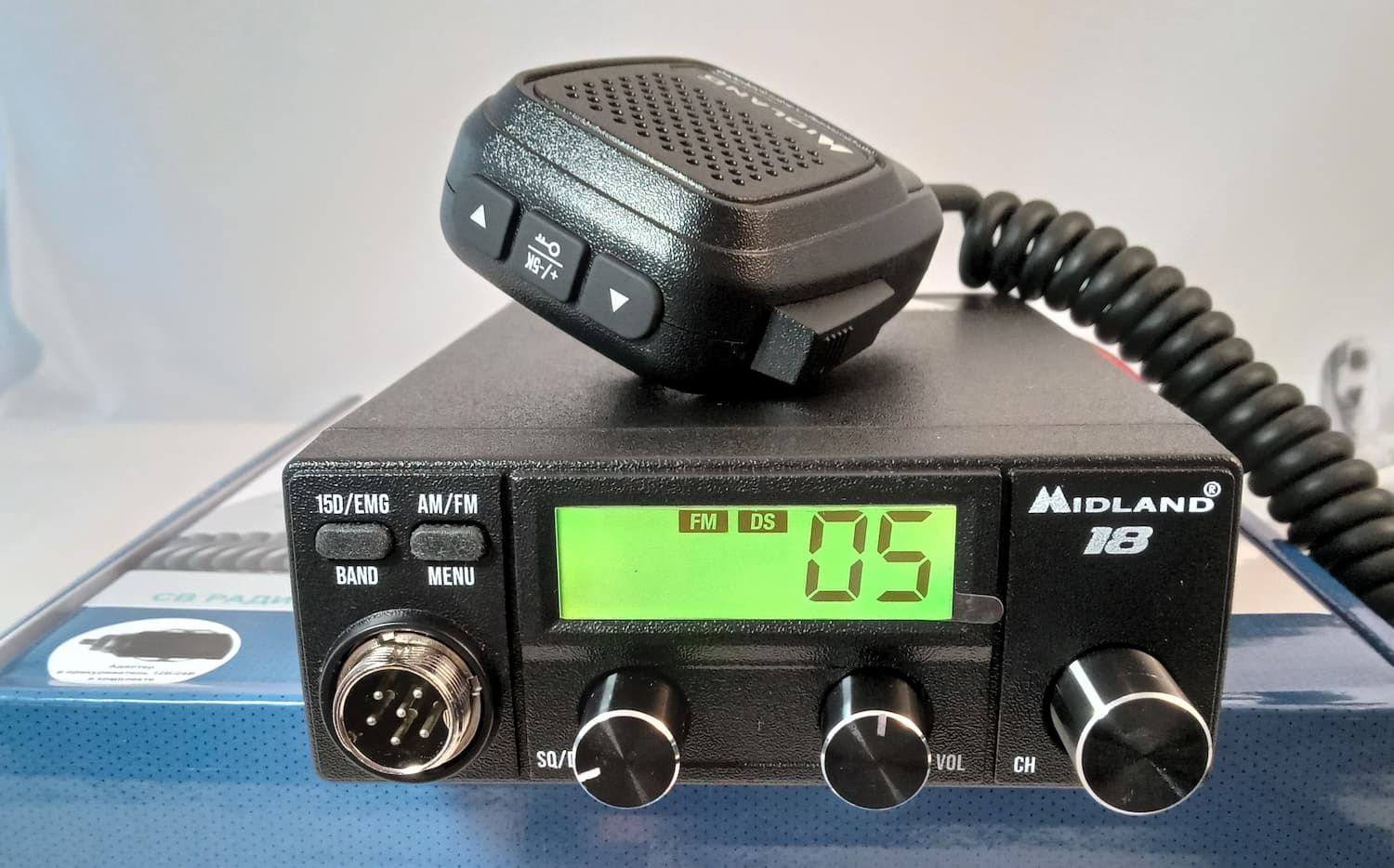
When choosing a mobile CB radio, drivers often remember the legendary Alan 100 Plus, a true classic of the genre. However, times change and new solutions replace proven models. Today we’re reviewing the Midland 18 (also known as Midland M-18), a compact radio station that takes the best from its predecessors and adds modern capabilities.
This radio is designed for those who value simplicity of operation without sacrificing functionality. Long-haul lorry drivers, road trippers, off-road enthusiasts—everyone will find what they need in the Midland 18 for reliable communication on the road.
What’s in the Box: First Impressions
Unboxing starts with a pleasant surprise. Midland doesn’t skimp on packaging and contents. The cardboard box with multilingual information immediately reveals the manufacturer’s serious approach to their product.
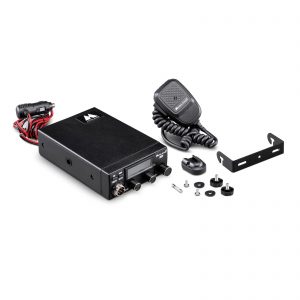
The package includes:
- Midland 18 radio in compact housing (114×43×180 mm, weight 499 g)
- PTT microphone with metal AERO-6 connector
- Control buttons on the microphone (channel switching, lock)
- Mounting bracket for vehicle installation
- Microphone holder
- Power cable with universal 12/24V voltage
- Cigarette lighter adapter
- Detailed instruction manual in multiple languages
- Branded stickers for enthusiasts
The microphone quality deserves special mention. The AERO-6 connector is made of metal—this isn’t just marketing, but real protection against wear during frequent connecting and disconnecting. In conditions of a lorry or 4×4 where vibration and shaking are the norm, such details matter.
Appearance and Ergonomics
The first thing that catches your eye is the size. The Midland 18 is genuinely compact. In modern cabins where every centimetre counts, this is a serious advantage. At the same time, compactness doesn’t mean compromised convenience—all controls are logically positioned and accessible.
Front Panel:
- Colour display with adjustable backlight (7 colour choices)
- Two multifunction buttons (15D/EMG/BAND and AM/FM/MENU)
- Volume control knob with power on/off function
- Squelch adjustment knob (SQ/DS)
- Channel selector encoder
Rear Panel:
- SO-239 antenna socket (standard)
- 3.5 mm external speaker socket
- Power connector (12/24V)
- PTT microphone socket (6-pin AERO-6)
The display deserves separate mention. The seven-segment indicator shows the channel number, whilst additional icons inform about operating mode: modulation type (AM/FM), signal level during reception and transmission, active functions (DS, RFG, ±5K), button lock. At night you can adjust the backlight brightness across three levels, very convenient for night runs.
Technical Specifications: Under the Bonnet
Let’s move to the dry figures that, for technically savvy drivers, tell more than marketing slogans.
Main Parameters:
- Frequency range: 26.965–27.860 MHz (CB standard)
- Number of channels: 120 (C, D, E bands)
- Modulation: AM and FM
- Output power: 4 watts (meets standard)
- Antenna impedance: 50 ohms
- Power supply: 12–28V (works on both cars and lorries)
- Receiver sensitivity: no worse than 0.4 µV
- Selectivity: over 55 dB
- Audio output power: 3 watts
- Standby current consumption: 200 mA
- Transmit mode current: 1.5 A
These specifications indicate that the Midland M18 is a serious device, not a toy. Sensitivity of 0.4 µV allows catching even weak signals, critical in difficult terrain or at great distance from the correspondent.
Power of 4 watts is the maximum permitted for civilian CB radios in most countries. Some might think this is little, but in practice with a properly tuned antenna, such power is sufficient for communication at distances of 5–15 km in urban areas and up to 30–40 km in open terrain.
Installation: Simple, But With Know-How
One of the main advantages of the Midland 18 is ease of installation. Even if you’ve never fitted a radio yourself, you’ll manage in half an hour to an hour.
Installation Procedure:
1. Choosing a Location. Here a simple rule applies: convenience and safety above all. The radio shouldn’t interfere with vehicle operation, but controls must be within reach. Classic locations are below the stereo, beside the steering column, or on the centre console.
2. Mounting. The mounting bracket allows secure device fixing. Important: don’t place the radio in the path of air flow from the air conditioning or heater—electronics overheating helps nobody.
3. Power Connection. The Midland 18 operates on 12V and 24V, making it universal. The package includes a cable with cigarette lighter adapter—the simplest connection option. However, for permanent use it’s better to connect power directly to the vehicle network through a fuse. This ensures stable operation and protects against voltage surges.
Important: Don’t try changing the fuse to a higher rating “just to be safe”. If the fuse regularly blows—the problem is in the wiring or the radio itself, not the fuse.
4. Antenna Installation. We’ll discuss this separately—it’s a critically important point.
5. Connecting the Microphone and External Speaker (if required). The microphone connects via a reliable 6-pin connector, the external speaker through a standard 3.5 mm jack.
Professional Advice: If you’re unsure of your vehicle electrical skills, visit a garage. Incorrect connection can harm both the radio and the vehicle’s electronics.
 Video YouTube Midland 18:
Antenna: Half the Battle for Communication
Many beginners think the radio is what matters most. In reality the antenna plays an equally important, often greater, role in communication quality.
Types of CB Antennas:
- Full-size quarter-wave (2.75 m)—ideal for efficiency but inconvenient due to length. Usually fitted on the bumper.
- Shortened antennas (0.7–1.5 m)—a compromise between efficiency and convenience. The most common variant for cars and lorries.
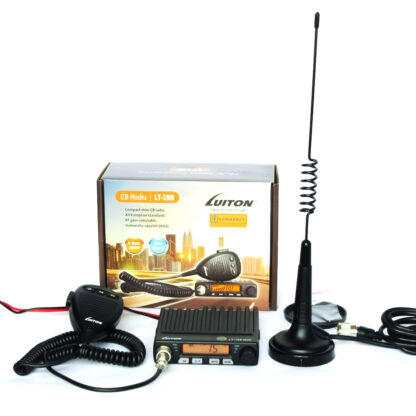
- Magnetic antennas—convenient as they’re easily removed and installed. Downside: speed limitation and less reliable mounting.
- Body-mount antennas—require drilling a hole in the bodywork but provide maximum mounting reliability.
Antenna Installation Locations:
1. On the Roof—optimal for even radiation in all directions. Downside: difficult to use long antennas.
2. On the Bonnet—radiation slightly stronger towards the rear wing on the opposite side from the mounting point.
3. On the Boot Lid—similar to bonnet, but radiation stronger towards the front wing.
4. On the Bumper—radiation predominantly forward and backward along the direction of travel. Suitable for full-size antennas.
Antenna Tuning is Mandatory! This isn’t a recommendation but a requirement. An untuned antenna:
- Degrades communication quality several times over
- During prolonged operation can damage the transmitter output stage
- Creates interference for other devices in the vehicle
Tuning is done using an SWR meter (standing wave ratio measuring device). Optimal SWR value is 1:1 to 1:1.5. If you lack antenna tuning experience, better consult specialists at a CB radio shop or knowledgeable colleagues at a lorry park.
Cable: Use only coaxial cable with 50-ohm impedance, recommended type RG58/U. Keep cable length to the minimum necessary—each extra metre reduces system efficiency.
First Power-Up and Configuration
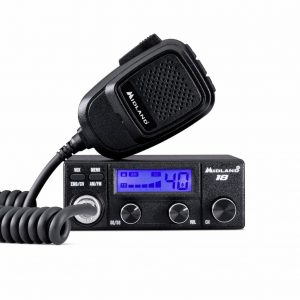
Connected, antenna installed—now the interesting part. The Midland 18 switches on by turning the volume knob clockwise. A gentle click sounds, the display lights up—the device is ready for operation.
Basic Configuration for Europe:
1. Band Selection. Press and hold the BAND button (15D/EMG/BAND button), then using the encoder or buttons on the microphone, select the EC band (European CEPT frequency grid, 40 channels FM). You’ll see the band designation and flashing RX on the display.
2. Modulation Selection. With a short press of the AM/FM button, select modulation type. For most European regions FM modulation is used, especially on the classic channel 5 (frequency 27.055 MHz, the calling channel in Europe). FM gives better sound quality and is standard across Europe.
3. Squelch Adjustment. Two options here:
- Threshold (SQ)—turn the squelch knob until noise in the speaker disappears. Adjusted individually for each channel.
- Automatic (DS/ASQ)—turn the knob anticlockwise until it clicks. The DS indicator appears on the display. Automation adjusts the threshold depending on signal level. Works excellently in most cases, but in difficult conditions (urban interference, mountainous terrain) manual mode is better.
4. Channel Selection. For Europe the standard calling channel is 5 (FM). Turn the encoder or press buttons on the microphone until “5” appears on the display. You can also use quick access: briefly press the 15D/EMG button—the radio automatically switches to channel 5 in FM mode.
For Eastern Europe and CIS:
If travelling to Eastern Europe or CIS countries, note that channel 15 AM is traditionally used by lorry drivers in these regions. The radio supports the RX band (120 channels AM/FM) for these areas.
Working With the Radio: Basic Functions
Channel Switching
Three methods to choose from:
- Turn the encoder on the radio body
- ↑/↓ buttons on the microphone (short press—channel by channel, long press—fast scrolling)
- Quick access to priority channels via 15D/EMG button
The last function is especially convenient. Pressing the 15D/EMG button, you sequentially switch between:
- Channel 15 AM (calling channel in CIS)
- Channel 9 AM (emergency channel)
- Channel 19 AM (road channel, popular with lorry drivers)
- Current channel (the one you were on before pressing the button)
The channel designation flashes on the display. This allows quick switching to the needed channel without turning the encoder and getting distracted from driving.
±5 kHz Function
Short press of the ±5K button on the microphone shifts the current channel frequency by –5 kHz. This is useful when the main channel frequency has interference or is occupied by other correspondents. Repeated pressing returns the frequency.
When the function is active, the microphone icon on the display flashes once per second—a convenient visual indicator.
Settings Menu
Long press of the MENU button opens access to advanced settings:
1. dS (Digital Squelch)—auto-squelch level setting (A1–A5). Factory value A3 suits most situations, but in strong interference conditions you can increase to A4 or A5.
2. rF (RF Gain)—input signal attenuator. Seven levels (r1–r7) or off (oF). For distant reception must be off. The attenuator is useful when operating in urban areas with nearby correspondents—it reduces receiver sensitivity, decreasing overload from strong signals.
3. to (Time Out Timer)—continuous transmission time limit (1–5 minutes or off). Default is 3 minutes. Useful function that protects the transmitter from overheating with accidentally pressed PTT button and prevents you monopolising the airwaves.
4. bL (Backlight)—display backlight brightness (3 levels). During daytime set maximum, at night reduce to minimum to avoid dazzling.
5. Ld (LED colour)—display colour. Seven variants: white, blue, green, cyan, red, purple, yellow. Purely aesthetic function, but pleasant—you can match the colour to your dashboard lighting.
Button Lock
Long press of the ±5K button on the microphone activates lock of all controls except PTT button, volume and squelch knobs. Very useful when the channel is fully configured and you don’t want to accidentally upset settings when driving on rough roads.
A padlock icon appears on the display—lock indication. Repeated long press of the same button releases the lock.
External Speaker
If the built-in speaker isn’t enough (for example, in a lorry with noisy engine), you can connect an external one. The 3.5 mm socket allows using standard speakers of 4–8 watts. When connecting an external speaker, the internal one automatically disconnects.
Many lorry drivers install an external speaker closer to the driver’s position or even extend it to the sleeping area—more convenient for hearing the airwaves without straining.
Practical Application: Who and Why
Long-Haul Lorry Drivers and Professional Drivers
For those who spend most of their life on the road, a CB radio isn’t luxury but necessity. The Midland 18 fits this role perfectly:
Operational road communication. Learn about traffic jams, accidents, police checkpoints, road conditions ahead—all this can be obtained from colleagues on air earlier than the satnav shows.
Real-world example: You’re driving on the M1, there’s congestion ahead. Switch to channel 19 (road channel), listen to conversations—turns out there’s an accident 5 km ahead, traffic is stopped. You manage to turn onto a bypass road, saving an hour or more.
Safety. In case of breakdown, accident or any emergency situation you can quickly contact other drivers and request help. Channel 9 (emergency) is monitored by many lorry drivers specifically for such situations.
Convoy Communication. If travelling with several vehicles (for example, moving house or on a long journey), the radio allows movement coordination, warning of dangers, arranging stops.
Road Trippers and Travellers
For motor travel enthusiasts, the Midland 18 opens new possibilities:
Communication in Areas Without Mobile Coverage. Mountains, forests, remote regions—everywhere the mobile phone becomes a useless brick, the CB radio works. Range in line-of-sight conditions can reach 30–40 km, sufficient for communication within a group or with the nearest settlement.
Example: A group of 4×4s heads to the Scottish Highlands. The lead vehicle checks route passability, main vehicles in the middle, tail-end charlie provides backup in case of breakdown. The radio allows constant contact, coordinating actions, warning of dangerous sections.
Communication With Locals. In remote areas many residents use CB radios for communication between villages. You can ask directions, enquire about overnight spots, obtain current road condition information.
Radio Enthusiasts
For radio amateurs interested in the CB band, the Midland M18 offers good functionality at an accessible price:
120 channels provide wide opportunities for experimenting with communication range, finding free frequencies, participating in DX sessions (long-distance communication).
AM/FM modulation choice allows working in different modes. AM gives greater range with weak signals, FM better sound quality with good signal.
Ability to work with different antennas. The standard SO-239 socket allows experimenting with various antenna types, achieving maximum efficiency.
Security and Services
Although professional services usually use specialised communication systems, the Midland 18 can be useful:
- Backup communication channel in case of main system failure
- Communication with civilian services (for example, coordination with drivers during evacuation, road closures)
- Territory patrol (security of holiday parks, warehouse complexes, where CB radio is an inexpensive alternative to professional systems for auxiliary services)
Comparison With Competitors
Midland 18 vs Alan 100
This comparison suggests itself—the Alan 100 was the benchmark CB radio for many driver generations.
What’s Common:
- Reliability and simplicity
- 4-watt power
- Classic control layout
Midland M18 Advantages:
- Colour display with adjustable backlight (Alan 100 has simple single-colour)
- 120 channels versus 40
- DS automatic squelch
- RF Gain attenuator
- ±5 kHz function
- Button lock
- Control buttons on microphone
- Universal 12/24V power (Alan 100 only 12V)
- Transmission time limiter
- Modern component base (reliability and longevity)
Conclusion: The Midland 18 is the Alan 100 evolved. Everything good in the classic is preserved and improved.
Midland 18 vs Modern Budget CB Radios
The market has many budget CB radios from Chinese manufacturers. How does the Midland compare?
Midland M18 Advantages:
- Brand with history and reputation (Midland operating since 1959)
- Build and materials quality
- Genuine 4 watts (many cheap models inflate specifications)
- Metal microphone connector (cheap ones use plastic)
- Detailed instruction manual in multiple languages
- Warranty and service support in Europe
What to Understand: A cheap radio might work one or two years and break. The Midland 18 with proper operation will serve 5–10 years and longer. Calculated per year of use, the savings are questionable.
Real Usage Scenarios
Scenario 1: Long-Haul Route London to Istanbul
A lorry driver at the trip start tunes the Midland 18 to channel 19 FM—the main lorry drivers’ channel in Europe. Throughout the route the radio allows:
- Obtaining traffic situation information from oncoming and following colleagues
- Learning about weigh stations
- Coordinating with other drivers at stops
- In emergency situations quickly contacting and receiving help
Approaching major cities, switches to channel 5 (calling channel) to learn the optimal route bypassing congestion. On the motorway periodically monitors channel 9 (emergency)—in case someone needs help.
Scenario 2: Family Journey to the Lake District
Three families in 4×4s set off on a motor journey. The route passes through remote areas with poor mobile coverage. Each vehicle is equipped with a Midland 18.
They agree to operate on channel 10 FM. The lead vehicle warns about potholes, fords, sharp bends. When one vehicle fell behind (wheel problem), immediately reported via radio—the group stopped and helped fix the problem.
In the evening at camp, children play “real lorry drivers”, talking between vehicles on the radio. Parents adjust backlight brightness to minimum so it doesn’t dazzle in darkness, and relax peacefully knowing that if anything happens, communication exists.
Scenario 3: Holiday Park Security Work
On holiday park territory three security guards patrol the perimeter. Each has a vehicle with Midland 18. They agreed to operate on channel 7 FM, so as not to interfere with civilians on standard channels.
They use button lock so when moving over rough terrain they don’t upset settings. RF Gain attenuator enabled at level r3—sensitivity reduced as the territory is small and powerful signals aren’t needed, plus less interference.
When one guard noticed suspicious activity on a distant perimeter section, quickly called colleagues via radio. Response time measured in seconds, not minutes as with phone calls.
Possible Problems and Solutions
Problem: Poor Communication Quality, Short Range
Possible Causes:
- Untuned or faulty antenna—90% of communication problems
- Incorrect antenna installation location
- Poor contact in antenna connector
- Using poor-quality cable
- RF Gain attenuator enabled (should be off for distant reception)
Solution:
- Check antenna with SWR meter, tune if necessary
- Move antenna to optimal location (roof, bumper)
- Check connector tightness, replace if necessary
- Use only quality RG58/U coaxial cable
- Enter menu, rF item, set value oF
Problem: Strong Interference, Airwave Noise
Possible Causes:
- Vehicle ignition system (spark plug arcing, high-voltage wires)
- Interference from vehicle electronics
- Incorrect radio cable routing
- External interference sources (power lines, industrial facilities)
Solution:
- Check spark plug and high-voltage wire condition
- Route radio cables away from standard wiring harnesses
- Use interference suppression filters
- Move to another location (if interference external)
- Try another channel
- Enable DS automatic squelch
- If interference localised, increase squelch threshold
Problem: Radio Won’t Power On
Possible Causes:
- No power (blown fuse, poor contact)
- Power cable fault
- Vehicle electrical system voltage outside 12–28V
Solution:
- Check fuse (in power cable), replace if necessary
- Check voltage at power connector with multimeter
- Check contact in cigarette lighter or mains connection point
- If necessary contact service centre
Problem: Radio “Freezing”, Incorrect Button Operation
Solution: Perform settings reset (RESET):
- Switch off radio
- Simultaneously press PTT and AM/FM buttons
- Holding them, switch on radio by turning volume knob
- When radio switches on, release buttons
All settings return to factory values. If after reset the problem hasn’t disappeared, contact service.
Problem: Fuse Keeps Blowing
Possible Causes:
- Short circuit in power cable
- Radio fault
- Using incorrect rating fuse
Solution:
- DO NOT fit a higher rating fuse!
- Inspect power cable for damage
- Disconnect radio from power, contact service centre
Maintenance and Longevity
The Midland 18 doesn’t require complex maintenance, but several simple rules will extend its life:
Regular Cleaning. Every few months wipe the housing free of dust. Special attention to connectors. Oxidised contacts are a frequent problem cause.
Antenna Checking. At least once yearly check antenna SWR. Over time tuning can drift due to corrosion, mechanical damage, changed installation conditions.
Cable Checking. Inspect power cable and antenna cable for damage. Chafed cable is an easy path to breakdown.
Moisture Protection. Although the Midland M18 doesn’t fear normal cabin humidity, flooding it with water isn’t advisable. When washing the vehicle, cover the radio or remove it.
Intended Use. Don’t attempt modifying the radio to increase power or operate on other bands. This not only violates law but can also damage the device.
Following these simple rules, the Midland 18 will serve you many years. Manufacturer’s stated service life is 5 years, but in practice with careful handling the radio works 10, even 15 years.
Legislation: What You Need to Know
In the UK and most of Europe, use of CB radios (27 MHz band, power up to 4 watts) is permitted without special permissions and registration under the CEPT framework. This is one of the few radio bands freely available to citizens.
Important Points:
- Permitted Power: up to 4 watts. The Midland 18 fully meets this requirement.
- Frequency Range: 26.965–27.860 MHz (C, D, E bands). All present in M-18.
- Prohibited: using CB radios for commercial activity (taxis, delivery) without proper licensing, using power amplifiers, creating interference for other users.
- Airwave Etiquette: don’t forget politeness on air. Before starting transmission ensure the channel is clear. Don’t interrupt others’ conversations. Use callsigns or names, maintain respectful language.
Abroad: If planning to use the radio in other countries, study local legislation beforehand. The Midland 18 has bands for different countries (I—Italy, D—Germany, EC—pan-European). In most European countries the EC band is permitted (40 channels FM, 4 watts).
Price and Availability
The Midland 18 belongs to the middle price segment of CB radios. At time of writing, prices in European shops range from £80–120 depending on region and retailer.
Is This Expensive or Cheap?
Cheap Chinese radios can be found for £40–50. Premium models cost £150–250. The Midland 18 sits squarely in the middle, offering excellent price/quality/functionality balance.
What the Price Includes:
- Proven brand with 60-year history
- Quality assembly
- 12-month warranty
- Complete package (no need to buy cables, mounts separately)
- Service support in Europe
For a lorry driver working routes, this is a one-time investment roughly the size of one or two fuel tanks. But this investment pays back in the first trips through time savings (bypassing congestion), money (information about weigh stations), and increased safety.
Verdict: Who Should Buy
Definitely Worth Buying:
- Professional drivers (lorry drivers, long-distance drivers)
- Road trippers frequently visiting remote areas
- Off-road travel and overlanding enthusiasts
- Vehicle owners who often travel in groups
- Radio amateurs interested in the CB band
- Those seeking a reliable and simple radio without unnecessary complications
Consider Other Options:
- If maximum communication range needed and willing to pay for premium model
- If planning work only in urban areas over short distances (perhaps a cheaper model suffices)
- If portable radio needed (Midland 18 is vehicle-mounted)
Conclusion
The Midland 18 is precisely the radio that can be recommended to a wide range of users. It isn’t overloaded with unnecessary functions, yet has everything necessary for comfortable operation.
Key Advantages:
- Reliability and build quality
- Ease of installation and configuration
- Convenient operation with thoughtful ergonomics
- 120 channels and two modulation types
- Colour display with adjustable backlight
- Automatic squelch
- Control buttons on microphone
- Universal 12/24V power
- Decent price/quality ratio
Minor Disadvantages:
- No built-in SWR meter (but this is rare in radios of this class)
- No USB port for firmware updates (though unnecessary)
This is a radio that simply works. Day after day, year after year. Without whims, surprises and unexpected breakdowns. This is exactly what a good CB radio should be.
If you’re seeking a modern reliable vehicle radio that will serve many years and won’t let you down at a critical moment, the Midland 18 deserves your attention. This isn’t just “another radio”, it’s the continuation of the legendary Alan 100+ tradition, but at a new technological level.
FAQ: Frequently Asked Questions
1. Can I use the Midland 18 without registration and permissions?
Yes, in the UK and Europe under CEPT, use of CB radios in the 27 MHz band with power up to 4 watts is permitted without registration, licences and special permissions. The Midland 18 fully meets these requirements. Simply purchase, install and use.
2. What’s the real communication range of the Midland 18?
Range depends on numerous factors: terrain relief, antenna installation height, antenna type, interference. In urban conditions 3–7 km, in open terrain 15–30 km, in ideal conditions (elevation, no interference, good antennas both sides) up to 40–50 km. Most important—a properly tuned antenna provides 70% of success.
3. Will the radio work in a lorry with 24V?
Yes, the Midland 18 has universal 12–28V power and works excellently in both cars (12V) and lorries (24V). This is one of the model’s advantages—no need to think about voltage converters.
4. Can I use this radio in Europe?
Yes, but you need to switch bands. In Europe the EC band (CEPT) is permitted—40 channels FM with 4-watt power. The Midland 18 has this band. Switch to EC, operate on channel 5 (European calling channel) and enjoy communication across Europe on legal grounds.
5. What if communication is poor or doesn’t work at all?
In 90% of cases the problem isn’t the radio but the antenna. Check:
- Is the antenna tuned (need SWR meter or specialist consultation)
- Is the antenna correctly installed (height, mounting location)
- Are there cable damages
- Are connectors properly tightened
- Is RF Gain attenuator disabled in radio menu (for distant reception should be oF)
If everything’s fine with the antenna but there’s no communication—perhaps simply no activity on air on the selected channel. Try channels 5, 19, 9 in FM or AM mode—usually there’s activity there.
6. How to configure the radio for use in Europe?
Simple procedure:
- Switch on radio
- Press and hold BAND button (15D/EMG/BAND)
- Using encoder or buttons on microphone, select EC band (European grid)
- Short press of AM/FM button selects FM modulation
- Using encoder set channel 5 (main European calling channel)
- Adjust squelch (turn knob until noise disappears or enable automatic DS)
Done, radio ready for operation.
7. Can I connect a headset or headphones?
Directly—no, the Midland 18 has no headset socket. But you can connect an external speaker via the 3.5 mm socket. If you specifically need a headset with microphone, special adapters exist allowing headset connection to the microphone socket, but this is a non-standard solution.
8. How long will the Midland 18 last?
With proper operation (following instructions, tuned antenna, regular cleaning) the radio will last minimum 5 years (stated service life). In practice many users operate similar models 10–15 years without problems. Main longevity enemies: operating without antenna or with untuned antenna (kills transmitter), moisture in connectors (contact oxidation), mechanical damage from careless handling.
Summary: The Midland 18 is an excellent choice for those seeking a modern, reliable and functional CB radio without overpaying for unnecessary complications. This is a radio that simply works, helping you stay connected where it truly matters.


This post is also available in:
English Italiano (Italian)